


Hyundai Digital Key
3.7836.00 Reviews
App Specs
- Version
- 1.0.31.3
- Updated On
- License
- Free
- Downloads
- 100,000+
- Developer
- Hyundai Motor America
- Categories
- Auto & Vehicles
- Platform
- Android, iOS
Screenshots
 Analysis by AppCompare
I find Hyundai Digital Key most compelling when it solves a small daily nuisance: having the right phone with me but not the key fob. It is a free Auto & Vehicles app from Hyundai Motor America, intended for access to a compatible Hyundai. That makes its value less about adding another general-purpose car app and more about whether a phone-based key fits the way you use your particular vehicle.
What free access means in practice
There is no app purchase price to weigh against the convenience. I see that as a useful starting point, not a reason to assume the whole experience is cost-free in every sense: the app’s usefulness depends on having a compatible Hyundai and being able to set it up with that car. If you already own one, trying the app does not require paying to download it. If you are choosing a vehicle mainly to get digital-key functions, I would first confirm that the exact model supports the setup you need rather than treating the app itself as proof of compatibility.
The app has a 3.9 average from around 4,800 ratings, with over 100,000 installs. Those figures suggest it has found an audience, but they do not tell me whether it will work smoothly with your specific phone and vehicle. I would treat compatibility and your own routine as more important than popularity when deciding whether to rely on it.
Where the value comes from
A phone key can be especially useful when your normal routine is already phone-first. I can imagine arriving home with shopping in both hands and not wanting to stop to find a fob, or heading out for a short errand and carrying fewer things. The gain is modest each time, but repeated little interruptions are exactly where a digital key can feel worthwhile.
There is also a practical backup question to think through. A phone is convenient because it is usually close at hand, but it is still a device that can run out of battery, be misplaced, or be left behind. I would keep the regular key available until I had tested the digital setup in ordinary conditions and knew what I would do if my phone were unavailable. That is not a knock against the app; it is sensible planning when a phone is part of getting into and using a car.
Compared with a conventional key fob, the appeal is less about replacing every familiar habit and more about having another way to access a compatible vehicle. Compared with broad connected-car apps, this one is focused on the digital-key role rather than being a general hub for every ownership task. That focus can be a plus if you simply want phone-based access, while someone looking for a wider set of vehicle-management tools may prefer to use Hyundai’s other relevant services alongside it.
Small checks that make setup less frustrating
Before relying on the app for a drive, I would do a calm first setup at home, with the vehicle nearby and enough time to follow the pairing steps. The original experience described here involves pairing the phone and car, with Bluetooth and NFC enabled. Testing the basic actions after pairing is more useful than assuming registration alone means everything is ready: check that the functions you expect are available and that you understand how you will use them.
Worth Reading Before You Choose

EA SPORTS FC Mobile 26 Is a Bigger Football Game, but It Takes Time

Flipboard Shows What News Apps Must Do Beyond the Feed

Switching to Android Auto Means Rethinking Your Driving Routine

Google Calendar Makes a Crowded Week Easier to Manage

Ludo King Makes the Most of the Minutes Between Plans

Baby Panda World Brings Quick Play to Modern Phones, but Its Game Library Feels Busy
A less obvious trade-off is that phone convenience can depend on phone habits. If you regularly switch devices, lend your phone to someone else, or keep Bluetooth and NFC off to conserve battery or for personal preference, a digital key may add a few steps rather than remove them. I would consider how often you change settings and devices before making it the only access method.
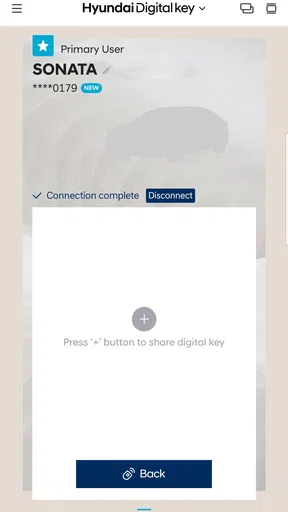
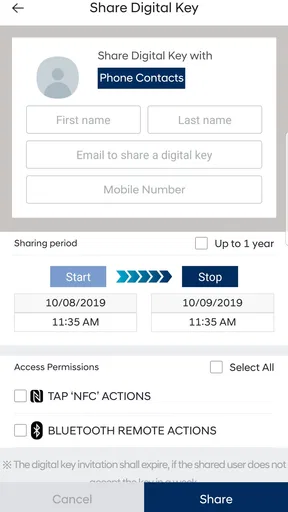
Sharing access also needs a little thought. The app’s described sharing option can accommodate up to three other people with different access levels. That can suit a household that shares one car, but I would set it up deliberately: decide who needs access, choose an appropriate level, and review access when someone no longer needs it. A shared digital key is convenient, but it also means the owner should be clear about who can use the vehicle.
Limits worth considering before depending on it
The biggest limitation is compatibility. This is not a universal phone key for any car; it is tied to compatible Hyundai vehicles. If your car is not supported, installing the app will not turn it into a digital-key vehicle. I would check the vehicle’s own documentation or ask a Hyundai dealer about the exact model and phone combination before changing how I carry keys.
There is a difference between having remote-style controls available and being able to use them in every situation. For instance, remote starting and convenience functions are useful only when they suit the vehicle and the moment; they are not a substitute for checking the car and its surroundings yourself. I would treat the phone as a way to request an action, not as a reason to stop using normal care around a vehicle.
Another trade-off is dependence on a single screen. A conventional fob has a familiar, dedicated role, while a smartphone handles calls, messages, navigation, and many other tasks. If you rely on your phone heavily during a day out, keeping a physical key as a backup may be the more comfortable arrangement. For someone who prefers simple, independent hardware and does not mind carrying a fob, the app may not improve the routine enough to matter.
Who is likely to get the most from it?
I would recommend trying it to a Hyundai owner whose vehicle is compatible, who carries an Android phone regularly, and who wants to reduce dependence on a separate key fob. It may be particularly handy for a household that shares a vehicle, since controlled access for other people can make coordination easier than passing one physical key back and forth.
It is less compelling for someone without a compatible Hyundai, a driver who rarely carries a smartphone, or anyone who would feel uneasy if access depended on a device they might forget or drain. It is also not the right answer if what you really want is a complete vehicle-management suite; the digital-key focus is narrower. In those cases, a standard key or a broader Hyundai vehicle app may be a better fit for the job.
A realistic day with a phone key
Picture leaving for work on a morning when your hands are full: bag in one hand, coffee in the other, phone already in your pocket. If the phone is paired and the vehicle supports the feature, opening the car without digging for a fob can make that departure smoother. Later, a family member who has been granted access can use their own permitted access instead of arranging a handoff. Those are ordinary situations, not dramatic transformations, and that is where I think the app’s best value lies.
I would still avoid making the first test happen when I am late or parked somewhere unfamiliar. Set it up and try the controls when there is no pressure, then decide whether it is reliable enough for your routine. That one habit helps separate a genuinely useful shortcut from a feature that sounds convenient but becomes another thing to troubleshoot at the worst time.
Platform and audience details
This is an Android app rated for Everyone, with a minimum Android requirement of 7.0 and a current version of 1.0.31.2. It was released on October 31, 2019. Those details are helpful if you are checking whether your device can install it, but device eligibility alone does not establish that your Hyundai is compatible; I would check both sides before depending on the app.
For an iPhone owner, this Android version is not the relevant download. I would look for Hyundai’s appropriate iOS option and verify vehicle compatibility there rather than assume that the Android app’s availability applies across platforms. The important decision is not simply whether a phone can run a key app, but whether the phone and the exact vehicle work together.
Overall, I see this as a practical, free add-on for the right Hyundai owner, not an essential download for every driver. If your vehicle is compatible and you like carrying fewer separate items, it is worth testing while keeping your usual key as a fallback until the routine feels dependable. If compatibility is uncertain or you prefer a dedicated fob, sticking with the conventional option is perfectly reasonable.
Let's dive into the world of the Hyundai Digital Key, an app that’s transforming the way we interact with our cars. If you're like me and always misplacing your keys, this app might just be your new best friend. It's designed to make your life easier by turning your smartphone into a digital key. How cool is that?
Unlocking the Future
First things first, let's talk about how the app actually works. Imagine leaving your traditional keys at home and stepping out with just your phone. This app allows you to unlock and start your Hyundai vehicle with a tap or even remotely. It’s like carrying a magic wand in your pocket!
The setup process is pretty straightforward. Once you download the app, it guides you through a simple registration process. You'll need to pair your smartphone with the car, which involves a few easy steps. Before you know it, you’re all set up and ready to go. Just make sure your phone's Bluetooth and NFC are turned on.
Features That Stand Out
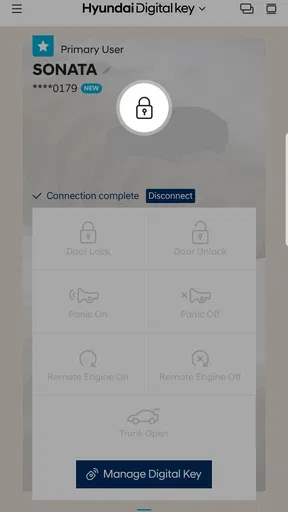
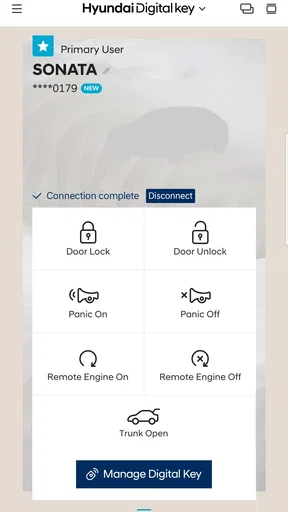
What I love about this app is its user-friendly interface. It’s sleek, intuitive, and doesn’t overwhelm you with too many options. The main dashboard gives you quick access to essential functions such as locking, unlocking, starting the engine, and even opening the trunk. It’s like having a remote control for your car.
Another fantastic feature is the ability to share your digital key with friends or family. You can grant access to up to three people, which is super handy if you’re sharing the car. Plus, you can set different levels of access, so you’re always in control.
Driving Convenience
The convenience doesn’t stop at just unlocking your car. With the app, you can also start your car’s engine remotely. This is a lifesaver during those freezing winter mornings or scorching summer afternoons. Imagine stepping into a car that’s already at the perfect temperature. It’s these small comforts that make a big difference.
Additionally, the app allows you to personalize your drive settings. You can adjust the seat position, mirrors, and even radio presets before you get in. It’s like your car is welcoming you with open arms, already set up just the way you like it.
Security and Peace of Mind
Security is a big concern when it comes to digital keys, but Hyundai seems to have this covered. The app uses high-level encryption to protect your data, and you can disable the digital key anytime you want. This means that even if your phone is lost or stolen, you can prevent unauthorized access to your car.
Furthermore, the app keeps a log of all activity, so you can always check who accessed the car and when. This feature provides an added layer of security and peace of mind.
Final Thoughts
In a nutshell, the app is a game-changer for anyone who’s always on the go. It blends technology with everyday convenience, making car ownership a little more futuristic and a lot more fun. While it’s currently only compatible with select Hyundai models, I’m excited to see how this technology evolves and becomes more widespread.
If you’re a tech enthusiast or someone who appreciates the finer things in life, this app is definitely worth checking out. It’s a small step towards a more connected and smarter driving experience. So, why not take your car keys digital and embrace the future?
Pros
- Easy setup with clear instructions.
- Seamless integration with Hyundai vehicles.
- Remote start and climate control features.
- Enhanced security with digital credentials.
- Convenient key sharing with family.
Cons
- Requires compatible Hyundai model.
- Limited to newer smartphone models.
- Battery drain on frequent use.
- Potential security concerns if phone is lost.
- No support for older Hyundai vehicles.
FAQs for Hyundai Digital Key
What is the Hyundai Digital Key app?
The Hyundai Digital Key app allows users to lock, unlock, and start their Hyundai vehicle using their smartphone. Compatible with select Hyundai models, this app provides a convenient and secure way to access your car without needing a physical key. It also enables users to share access with others through their smartphones.
Which devices are compatible with the Hyundai Digital Key app?
The Hyundai Digital Key app is compatible with both Android and iOS devices. However, users should ensure their smartphone has NFC (Near Field Communication) capabilities, as this technology is essential for the app to function. Always check the app store for specific device compatibility requirements before downloading.
How secure is the Hyundai Digital Key app?
Hyundai has implemented advanced security measures to protect users' data and vehicle access. The app uses encryption to safeguard information, and users can manage permissions and access levels directly from their smartphones. It's crucial to maintain device security, such as using strong passwords and enabling biometric authentication.
Can I share my Hyundai Digital Key with others?
Yes, the Hyundai Digital Key app allows users to share vehicle access with others. You can grant permissions to family members or friends by sending a digital key to their smartphones. This feature is fully customizable, allowing you to set access levels and revoke permissions when necessary for added control.
What should I do if my smartphone is lost or stolen?
If your smartphone with the Hyundai Digital Key app is lost or stolen, immediately revoke the digital key permissions from your vehicle and report the loss to Hyundai's customer service. Additionally, contact your mobile carrier to secure your device and consider changing passwords to protect your information.


